
Tomorrow I’ll be hosting a link-up for craft projects here on Walkin’ in High Cotton. That means you can link up your project to share with everyone.
If you don’t have a blog to link to–don’t worry! You can still share your project. You’ll need to have an account with a web-based photo sharing site like Flickr (which I use) or Picasa (which is Google’s version). Both sites offer completely, no-strings-attached, free accounts and it only takes a few minutes to set up. The free accounts have limits to the amount of upload space, but it’s pretty big. I know Flickr allows up to 300 MB a month (which is like 200-300 pictures). There’s several other photo sharing sites that require a paid membership, but that might work for you too if you have (or expect to have) lots of photos. I’m sure there’s other free photo-sharing sites as well, but I only know what I know.
I’ll give a quick demo of Flickr, since I know it, but I’m sure Picasa (or others) are very similar.
1. Set up your account. You can even save time by signing in from Yahoo if you have a Yahoo account. Same with Picasa if you have a Google account.

2. Go to “Upload” to pull your picture from your camera or computer. When it asks you about permissions, be sure to check “public” so that everyone can see your picture when they click on your link.

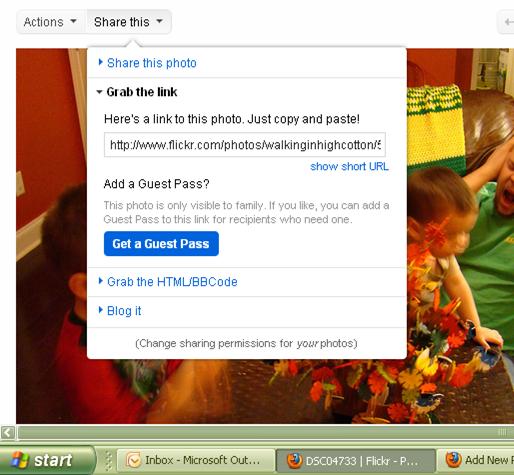
3. Choose where the pictures are located and click “upload” to pull them into your account (Flickr calls it your “photostream.”) Once they’re in your Photostream or your web album, click on the picture to get to the photo details page. Once there, go to “Share This.”

4. What you’re looking for is the url or link address for the picture. With Flickr, you click on “Grab the Link.”
If you don’t want to just share the picture, you can always add a description (what materials you used, any techniques you want to share, or anything else you want people to know when they see your project) to the picture and it will show up on your picture page when people visit your link in the link up list. Flickr (and I think Picasa too) even allow people to leave comments on your picture if you’re interested in feedback from your visitors.
I’m no expert, but if you need help, shoot me an email and I’ll try to help…So be sure to come back tomorrow and link up to Wednesday Windings and spread some crafty inspiration!
